

Thursday, April 24, 2008
 SVN Finder integration on the Mac
Thursday, April 24, 2008 
Love TortoiseSVN on the PC? You might like this on the Mac:
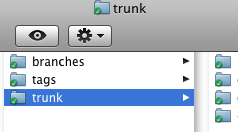
Status icons in the Finder, and integrated into Finder contextual menus! SCPlugin to the rescue. It's pretty close to Tortoise as far as I've seen using it. Command-line is the best, but for those who don't actually like that interface, this is pretty spectacular. Nice to see something like this on the Mac.
Update
After one day working, this thing has gone bad on me. If I try to access the contextual menu item "More" the Finder crashes and restarts itself. I can't get this to work at all anymore - so I am going to uninstall this. Thank God I didn't come to rely on this quite yet, or else I'd be a little screwed as I don't like the Terminal very much. SVNX I guess.
Oh well...
Status icons in the Finder, and integrated into Finder contextual menus! SCPlugin to the rescue. It's pretty close to Tortoise as far as I've seen using it. Command-line is the best, but for those who don't actually like that interface, this is pretty spectacular. Nice to see something like this on the Mac.
Update
After one day working, this thing has gone bad on me. If I try to access the contextual menu item "More" the Finder crashes and restarts itself. I can't get this to work at all anymore - so I am going to uninstall this. Thank God I didn't come to rely on this quite yet, or else I'd be a little screwed as I don't like the Terminal very much. SVNX I guess.
Oh well...

Comments:
There are currently 1 Comments:
-
 Adam Byrtek said...“I also had some issues with SCPlugin and decided to build my own collection of Subversion scripts for Finder and made it available here:
http://svn-finder.sourceforge.net/
Let me know if you find it useful!”
