

Thursday, April 16, 2009
 From my phone
Thursday, April 16, 2009  2 Comments
This is a test SMS post
Sending an email from an iPhone application
2 Comments
This certainly is not the most secure way of sending an email by any means, but it does work. So you would like your iPhone application to be able to send an email - perhaps a feedback form of some kind, etc. The example supplied here contains a UITextField and a UIButton. A UIAlertView and a UIActionSheet are also used. Oh, and there is a little snippet of PHP to put on your server someplace (that's the unsecure part here).
Your .h file:
Your .h file:
#import <UIKit/UIKit.h>And now your .m file:
@interface SendEmailViewController : UIViewController{
IBOutlet UIButton *button;
IBOutlet UITextField *messageText;
IBOutlet UIButton *backgroundButton;
}
@property (nonatomic, retain) UIButton *button;
@property (nonatomic, retain) UITextField *messageText;
@property (nonatomic, retain) UIButton *backgroundButton;
-(IBAction)sendMail:(id)sender;
-(IBAction)textFieldDoneEditing:(id)sender;
-(IBAction)backgroundClick:(id)sender;
@end
#import "SendEmailViewController.h"And lastly your PHP file:
@implementation SendEmailViewController
@synthesize button, messageText, backgroundButton;
-(IBAction)textFieldDoneEditing:(id)sender {
[sender resignFirstResponder];
}
-(IBAction)backgroundClick:(id)sender {
[messageText resignFirstResponder];
}
-(void)displayAlert {
UIAlertView *alert = [[UIAlertView alloc] initWithTitle:@"Email Sent" message:@"Thank you for contacting me" delegate:nil cancelButtonTitle:@"OK" otherButtonTitles:nil];
[messageText setText:@""];
[alert show];
[alert release];
}
-(void)displaySheet {
NSString *msg = nil;
msg = [[NSString alloc] initWithFormat:@"Send Email? Your message:\"%@\"", messageText.text];
UIActionSheet *actionSheet = [[UIActionSheet alloc] initWithTitle:msg delegate:self cancelButtonTitle:@"Not yet" destructiveButtonTitle:@"Yes" otherButtonTitles:nil];
[actionSheet showInView:self.view];
[actionSheet release];
[msg release];
}
-(void)actionSheet:(UIActionSheet *)actionSheet didDismissWithButtonIndex:(NSInteger)buttonIndex {
if( !(buttonIndex == [actionSheet cancelButtonIndex]) ){
NSString *post = nil;
post = [[NSString alloc] initWithFormat:@"message=%@",messageText.text];
NSData *postData = [post dataUsingEncoding:NSASCIIStringEncoding allowLossyConversion:YES];
NSString *postLength = [NSString stringWithFormat:@"%d", [postData length]];
NSMutableURLRequest *request = [[[NSMutableURLRequest alloc] init] autorelease];
[request setURL:[NSURL URLWithString:@"http://www.yourserveraddy/yourScript.php"]];
[request setHTTPMethod:@"POST"];
[request setValue:postLength forHTTPHeaderField:@"Content-Length"];
[request setValue:@"application/x-www-form-urlencoded" forHTTPHeaderField:@"Content-Type"];
[request setHTTPBody:postData];
[ NSURLConnection connectionWithRequest:request delegate:self ];
[post release];
[self displayAlert];
}
}
-(IBAction)sendMail:(id)sender {
[self displaySheet];
}
- (void)didReceiveMemoryWarning {
// Releases the view if it doesn't have a superview.
[super didReceiveMemoryWarning];
// Release any cached data, images, etc that aren't in use.
}
- (void)viewDidUnload {
// Release any retained subviews of the main view.
// e.g. self.myOutlet = nil;
}
- (void)dealloc {
[super dealloc];
[button release];
[messageText release];
[backgroundButton release];
}
<?phpYou just need to set your outlets and set you should be all set.
$message = $_REQUEST['message'] ;
mail( "recipient@server.com", "Test Message", $message );
?>
Labels: email, Objective-C, Xcode
Monday, April 13, 2009
Custom buttons for your Objective-C applications
Monday, April 13, 2009
0 Comments
You have a few choices (that I know of right now) for making custom versions of your buttons for an Objective-C project in InterfaceBuilder (iPhone). You can turn your UIButton into a custom type, and use a background image... however you're locked into making the background match the size of your button.
In Flash the option of using a Scale-9 approach is available and it's here for Objective-C too. This method will allow you to make very small base graphics to serve as your button background and it will resize properly. The only drawback is that you'll need to register each button to affect it. The other option would be to subclass UIButton and then make sure you use it instead. I haven't had the need to do that, nor have I even really tried that.
To see the Obj-C skinning in action, here is the code I am using from a test project that I have (you can see what happens as well):
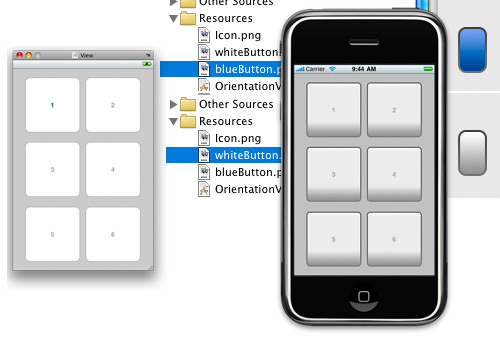
In Flash the option of using a Scale-9 approach is available and it's here for Objective-C too. This method will allow you to make very small base graphics to serve as your button background and it will resize properly. The only drawback is that you'll need to register each button to affect it. The other option would be to subclass UIButton and then make sure you use it instead. I haven't had the need to do that, nor have I even really tried that.
To see the Obj-C skinning in action, here is the code I am using from a test project that I have (you can see what happens as well):
- (void)viewDidLoad {
UIImage *buttonImageNormal = [UIImage imageNamed:@"whiteButton.png"];
UIImage *stretchableButtonImageNormal = [buttonImageNormal stretchableImageWithLeftCapWidth:12 topCapHeight:10];
[button1 setBackgroundImage:stretchableButtonImageNormal forState:UIControlStateNormal];
[button2 setBackgroundImage:stretchableButtonImageNormal forState:UIControlStateNormal];
[button3 setBackgroundImage:stretchableButtonImageNormal forState:UIControlStateNormal];
[button4 setBackgroundImage:stretchableButtonImageNormal forState:UIControlStateNormal];
[button5 setBackgroundImage:stretchableButtonImageNormal forState:UIControlStateNormal];
[button6 setBackgroundImage:stretchableButtonImageNormal forState:UIControlStateNormal];

UIImage *buttonImagePressed = [UIImage imageNamed:@"blueButton.png"];
UIImage *stretchableButtonImagePressed = [buttonImagePressed stretchableImageWithLeftCapWidth:12 topCapHeight:10];
[button1 setBackgroundImage:stretchableButtonImagePressed forState:UIControlStateHighlighted];
[button2 setBackgroundImage:stretchableButtonImagePressed forState:UIControlStateHighlighted];
[button3 setBackgroundImage:stretchableButtonImagePressed forState:UIControlStateHighlighted];
[button4 setBackgroundImage:stretchableButtonImagePressed forState:UIControlStateHighlighted];
[button5 setBackgroundImage:stretchableButtonImagePressed forState:UIControlStateHighlighted];
[button6 setBackgroundImage:stretchableButtonImagePressed forState:UIControlStateHighlighted];
  [super viewDidLoad];
}Monday, April 6, 2009
Core Animation not being only for animation
Monday, April 6, 2009
0 Comments
I just read a very interesting post at Theocacao (Scott Stevenson) regarding the Core Animation framework implementation in user interfaces. The gist is that typically you'd import the framework when you want to do some kind of animation, but there are other uses for it as well (just as some are using Pixel Bender in AS3 to offload some heavy computation threadlike).
Animation is the most significant obstacle that Core Animation tackles, but it's far from being the only benefit. This is a really versatile framework with huge performance potential. You can have thousands of CALayers on the screen at the same time without breaking a sweat. It probably wouldn't be practical to try the same with NSView instances.You can enjoy the entire post the follow up comments right here. This is a bit too advanced for me at the moment, I like .xib files and creating views and all that in InterfaceBuilder, but I can see what this guy is on about.
NSURLConnection Error Codes
0 Comments
enum {
   NSFileNoSuchFileError = 4,
   NSFileLockingError = 255,
   NSFileReadUnknownError = 256,
   NSFileReadNoPermissionError = 257,
   NSFileReadInvalidFileNameError = 258,
   NSFileReadCorruptFileError = 259,
   NSFileReadNoSuchFileError = 260,
   NSFileReadInapplicableStringEncodingError = 261,
   NSFileReadUnsupportedSchemeError = 262,
   NSFileWriteUnknownError = 512,
   NSFileWriteNoPermissionError = 513,
   NSFileWriteInvalidFileNameError = 514,
   NSFileWriteInapplicableStringEncodingError = 517,
   NSFileWriteUnsupportedSchemeError = 518,
   NSFileWriteOutOfSpaceError = 640,
   NSKeyValueValidationError = 1024,
   NSFormattingError = 2048,
   NSUserCancelledError = 3072,

   NSFileErrorMinimum = 0,
   NSFileErrorMaximum = 1023,
   NSValidationErrorMinimum = 1024,
   NSValidationErrorMaximum = 2047,
   NSFormattingErrorMinimum = 2048,
   NSFormattingErrorMaximum = 2559,

   NSExecutableErrorMinimum = 3584,
   NSExecutableNotLoadableError = 3584,
   NSExecutableArchitectureMismatchError = 3585,
   NSExecutableRuntimeMismatchError = 3586,
   NSExecutableLoadError = 3587,
   NSExecutableLinkError = 3588,
   NSExecutableErrorMaximum = 3839
}
Thursday, April 2, 2009
A big difference between Objective-C and AS3
Thursday, April 2, 2009
4 Comments
Objective-C. String comparisons from text controls and normal strings. It's something you just take for granted in AS3.
I had a method being called by a UITextField in an iPhone application whenever the value of the field changed.
Anyway, I hope this helps someone save time in their day.
myText_txt.text = "Hello";Easy enough on that string comparison. I thought it would be the same for Objective-C and it isn't. I felt like an idiot for a while today as I struggled with that logic above.
if( myText_txt.text == "Hello" ){ trace("There");}
I had a method being called by a UITextField in an iPhone application whenever the value of the field changed.
-(IBAction)editing:(id)sender {
     if( field1.text == @"" ){
          button.hidden = YES;
     } else {
          button.hidden = NO;
     }
     NSLog( @"%@", field1.text );
}
That seems simple enough but it never worked as intended. It's comparing pointers instead of String values. The code below (if it were not for Google, I would have never stumbled upon this myself) does what I wanted.-(IBAction)editing:(id)sender {
if ([field1.text length] && [field1.text compare:@"Eric"
options:NSLiteralSearch
range:NSMakeRange(0,4)] == NSOrderedSame){
button.hidden = NO;
} else {
button.hidden = YES;
}
}So what's happening here? We check for a string length to make sure that the compare doesn't blow up with an out of range error. This is essentially the same thing as checking for "" in AS3: if( field1.text != "")... And then there is that compare. I never would have found that myself. The options show how you can check a certain number of characters into the string... and here I should check to make sure the length >= to that range, but I'm not. I should add that. Anyway, I hope this helps someone save time in their day.
Labels: Xcode
Wednesday, April 1, 2009
Xcode: get alphabetized methods all the time
Wednesday, April 1, 2009
0 Comments
After a bit of chatter with an Apple forum administrator, I found a way to get Xcode to do what I want in regards to it's method popup menu.
Quick overview:
I like using TextMate on the Mac for ActionScript 3 coding (it's not FlashDevelop, but it's pretty good). The method popup menu for methods is always alphabetized. Personally, I like this a lot. In FlashDevelop you can view all your methods but it's listed in the order they exist in the class file.While using Xcode, the method popup menu can be affected by using #pragma mark to a nice effect, however the list of methods by default is in the order they exist in the class file.
After some conversation, I was informed that holding the option key down before clicking on that method menu will alphabetize the list. That's cool, but what if you don't want to remember to use the modifier key all of the time?
In the Terminal, enter this:
$ defaults write com.apple.Xcode PBXSortMethodsPopup -bool YES
Now by default that menu will be alphabetized and holding down the option key prior to selection will show you in file order. Awesome. I don't know what this does for your pragma marks, I'll have to check that tomorrow. Update: It actually ignores all set pragma marks (for now anyway).
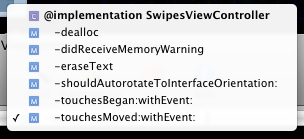
Above: this is what you should by default after you run the Terminal command above. Remember to restart Xcode. Now, when you Option-click that menu after you'll see this:
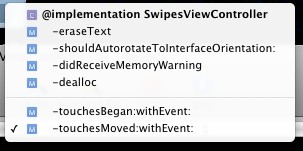
One thing that doesn't happen is alphabetizing within pragma mark blocks themselves, although Apple has already looked into this. It would be a subtle yet nice addition to the tool.
Labels: Xcode
#pragma mark in Xcode - learn to love it!
0 Comments
Update: Thanks to Twitter and 0xced, I found out that //MARK: - and //MARK: Whatever works as well, and is a whole lot more portable.

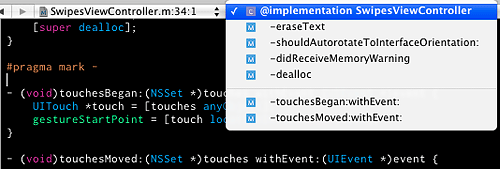
That menu that allows you to jump around within your code can be modified a bit, allowing you to group your items either by means of a separator by using "#pragma mark -" or by using a title by using "#pragma mark <whatever>". That's a very useful bit of information, especially when you start getting into long bits of code in the same class file.
I love it. I wish Xcode would also list the methods in alphabetical order in that menu by block, but the #pragma mark stuff really does help a lot.
Changing an iPhone's code signing to install from Xcode
0 Comments
I am still pretty new to the iPhone SDK, so I ran into a situation you might find yourself in and perhaps this post will save you a little time and frustration.

I downloaded a sample project from someone that runs perfectly well enough in the simulator, but I wanted to see how it ran on an actual device (especially with a real shake). So I set my active SDK to Device - 3.0 | Debug. Right away I got a general error.
Code Signing Identity 'Insert Name Here' does not match any valid, non-expired, code-signing certificate in your keychain. Line Location Tool:0
Ahh... I get it. Where to change that? Well, there are two places you should change this... Project > Edit Project Settings as well as Project > Edit Active Target.
Assign your code signing, and you'll be publishing to your device in no time. I changed it for Project Settings but not for the target. This may be a no brainer for some, but I stumbled upon it and solved it by accident.