

Thursday, July 30, 2009
 Xcode: Want to print line numbers?
Thursday, July 30, 2009  0 Comments
I usually like to print out some of my classes and mull them over late at night after getting my ass kicked for the twelfth time in Battlefield 1943 (PS3 or 360, it doesn't matter). I like to have line numbers printed, and by default Xcode does a really lousy job of printing code. So I decided to look around Google and see if there was anything handy.
Sure enough I found a site explaining how to use something called enscript. I installed it and then in the Terminal (remember to sudo su in there), ran the install script. The directions are pretty simple and for the most part it works. I get a lot of wrap-arounds which look ghastly (the default is two columns per landscape page).
You HAVE to open each file in it's own window and then run the shell script. It won't work if you merely select it in the Groups and Files tree. Have fun!
Sure enough I found a site explaining how to use something called enscript. I installed it and then in the Terminal (remember to sudo su in there), ran the install script. The directions are pretty simple and for the most part it works. I get a lot of wrap-arounds which look ghastly (the default is two columns per landscape page).
You HAVE to open each file in it's own window and then run the shell script. It won't work if you merely select it in the Groups and Files tree. Have fun!
Primanti's here we come!! (2)
2 Comments
That's right. Maybe get in a little Latrobe Steelers action as well.
iPhone: Make your Default.png sexy
5 Comments
The Default.png file that automatically gets displayed while your application is loading is a nice way to give the user some feedback (instead of looking at a black screen for a little while). With the iPhone 3Gs this might not be such a big deal, but in any case when loading is complete, the Default.png goes away instantly and you merely snap into your application's view. It works well enough, but it's not very sexy.
I've seen where some will take their default view and snapshot that and bring it into Photoshop, and lay down a semi-transparent black on top of it to make it look disabled. Thus you snap into the view in a less jarring manner. This is a little better, but it's still not sexy.
Why not use animation? Place a UIImageView over everything and when we're done launching, remove it with a fade and some zoom? Sure... and here is some quick code to do just that:
I've seen where some will take their default view and snapshot that and bring it into Photoshop, and lay down a semi-transparent black on top of it to make it look disabled. Thus you snap into the view in a less jarring manner. This is a little better, but it's still not sexy.
Why not use animation? Place a UIImageView over everything and when we're done launching, remove it with a fade and some zoom? Sure... and here is some quick code to do just that:
In your YourAppDelegate.h create a reference to a UIImageView and also whip up a method you'll call through code:
@interface YourAppDelegate : NSObject <UIApplicationDelegate> {
    UIWindow *window;
    YourAppViewController *viewController;
    UIImageView *splashView;
}
- (void)startupAnimationDone:(NSString *)animationID finished:(NSNumber *)finished context:(void *)context;
Now, in YourAppDelegate.m add the guts of that method and some additional code in your applicationDidFinishLaunching:- (void)startupAnimationDone:(NSString *)animationID finished:(NSNumber *)finished context:(void *)context {
[splashView removeFromSuperview];
[splashView release];
}
- (void)applicationDidFinishLaunching:(UIApplication *)application {
[window addSubview:viewController.view];
[window makeKeyAndVisible];
// Make this interesting.
splashView = [[UIImageView alloc] initWithFrame:CGRectMake(0,0, 320, 480)];
splashView.image = [UIImage imageNamed:@"Default.png"];
[window addSubview:splashView];
[window bringSubviewToFront:splashView];
[UIView beginAnimations:nil context:nil];
[UIView setAnimationDuration:2.0];
[UIView setAnimationTransition:UIViewAnimationTransitionNone forView:window cache:YES];
[UIView setAnimationDelegate:self];
[UIView setAnimationDidStopSelector:@selector(startupAnimationDone:finished:context:)];
splashView.alpha = 0.0;
splashView.frame = CGRectMake(-60, -85, 440, 635);
[UIView commitAnimations];
}You're done. You could mess with this in other ways, but it makes the whole entry into your application a lot more appealing in my opinion.Labels: iPhone
Wednesday, July 29, 2009
iPhone: MPMusicPlayerController: currentPlaybackTime and playbackDuration
Wednesday, July 29, 2009
1 Comments
I started playing around with the iPhone MPMusicPlayerController and found that getting and displaying a track's duration is pretty simple, displaying the current time of the track wasn't so easy. I was expecting to find a notification of some kind akin to IsPlaying or something like that so that I didn't need to fire my own NSTimer.
Well, there doesn't seem to be one, we have access to MPMusicPlayerControllerNowPlayingItemDidChangeNotification, MPMusicPlayerControllerPlaybackStateDidChangeNotification, and MPMusicPlayerControllerVolumeDidChangeNotification. How do you like those constants? Verbose to say the least.
Anyway, I found that I had to run my own Timer, and I just started it up within viewDidLoad - every 0.5 seconds, almost like an onEnterFrame in Flash. In the end my code looks something like this... this may save you some time. The labels are IBOutlet objects, etc.
Well, there doesn't seem to be one, we have access to MPMusicPlayerControllerNowPlayingItemDidChangeNotification, MPMusicPlayerControllerPlaybackStateDidChangeNotification, and MPMusicPlayerControllerVolumeDidChangeNotification. How do you like those constants? Verbose to say the least.
Anyway, I found that I had to run my own Timer, and I just started it up within viewDidLoad - every 0.5 seconds, almost like an onEnterFrame in Flash. In the end my code looks something like this... this may save you some time. The labels are IBOutlet objects, etc.
- (void)onTimer:(NSTimer *)timer {
 long currentPlaybackTime = self.musicPlayer.currentPlaybackTime;
 int currentHours = (currentPlaybackTime / 3600);
 int currentMinutes = ((currentPlaybackTime / 60) - currentHours*60);
 int currentSeconds = (currentPlaybackTime % 60);
 self.currentLabel.text = [NSString stringWithFormat:@"%i:%02d:%02d", currentHours, currentMinutes, currentSeconds];
}

- (void)viewDidLoad {
    [super viewDidLoad];
    self.musicPlayer = [MPMusicPlayerController iPodMusicPlayer];

    // Initial sync of display with music player state
    [self handleNowPlayingItemChanged:nil];
    [self handlePlaybackStateChanged:nil];
    [self handleExternalVolumeChanged:nil];

    // Register for music player notifications
    NSNotificationCenter *notificationCenter = [NSNotificationCenter defaultCenter];
    [notificationCenter addObserver:self
                           selector:@selector(handleNowPlayingItemChanged:)
                               name:MPMusicPlayerControllerNowPlayingItemDidChangeNotification
                             object:self.musicPlayer];
    [notificationCenter addObserver:self
                           selector:@selector(handlePlaybackStateChanged:)
                               name:MPMusicPlayerControllerPlaybackStateDidChangeNotification
                             object:self.musicPlayer];
    [notificationCenter addObserver:self
                           selector:@selector(handleExternalVolumeChanged:)
                               name:MPMusicPlayerControllerVolumeDidChangeNotification
                             object:self.musicPlayer];
    [self.musicPlayer beginGeneratingPlaybackNotifications];
 currentTimer = [NSTimer scheduledTimerWithTimeInterval:0.5 target:self selector:@selector(onTimer:) userInfo:nil repeats:YES];
}

- (void)handleNowPlayingItemChanged:(id)notification {
    MPMediaItem *currentItem = self.musicPlayer.nowPlayingItem;
    self.songLabel.text   = [currentItem valueForProperty:MPMediaItemPropertyTitle];
    self.artistLabel.text = [currentItem valueForProperty:MPMediaItemPropertyArtist];
    self.albumLabel.text  = [currentItem valueForProperty:MPMediaItemPropertyAlbumTitle];

 // Current Playback Value - via the running timer

 // The total duration of the track...
 long totalPlaybackTime = [[[musicPlayer nowPlayingItem] valueForProperty: @"playbackDuration"] longValue];
 int tHours = (totalPlaybackTime / 3600);
 int tMins = ((totalPlaybackTime/60) - tHours*60);
 int tSecs = (totalPlaybackTime % 60 );
 self.durationLabel.text = [NSString stringWithFormat:@"%i:%02d:%02d", tHours, tMins, tSecs ];

    // Display album artwork. self.artworkImageView is a UIImageView.
    CGSize artworkImageViewSize = self.artworkImageView.bounds.size;
    MPMediaItemArtwork *artwork = [currentItem valueForProperty:MPMediaItemPropertyArtwork];
    if (artwork != nil) {
        self.artworkImageView.image = [artwork imageWithSize:artworkImageViewSize];
    } else {
        self.artworkImageView.image = nil;
    }
}
Labels: iPhone
Monday, July 27, 2009
Base64 encoder to wave test (12)
Monday, July 27, 2009
0 Comments
Testing my Base64 to wave notification routine. I am doing a forced image resize.
Friday, July 24, 2009
Have a great weekend! Enjoy the weather. If you can.
Friday, July 24, 2009
2 Comments
I am using my RSS change detection AIR application which is going to test send a base64 image in this notification. I was going to post the source code for getting this working from RSS to loading as Bitmap turning into BitmapData then base64encoding the image and including it in the notification request... but I won't have enough time before I scoot for the weekend.
Let's hope this works :)
Let's hope this works :)
Flash CS4 AIR bug
0 Comments
If you decide that you want to author a quick AIR file using Flash CS4 instead of using Flex Builder than you might run into a little bug. If you un-check the resizable window box in the AIR settings, it will be ignored in your AIR application.
A workaround is to set the thing as resizable, but set the minimum and maximum widths to match your application stage. You'll still see the resizing thumb in the lower right corner, but at least the thing won't resize for you.
Best to use Flex methinks ;)
A workaround is to set the thing as resizable, but set the minimum and maximum widths to match your application stage. You'll still see the resizing thumb in the lower right corner, but at least the thing won't resize for you.
Best to use Flex methinks ;)
Verizon Hub: is it wonderful?
0 Comments
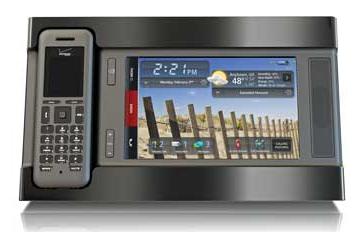
It looks pretty sexy, and the voicemail feature as well as contact dialing is cool. But most of the time if I need to call someone I just use the cellphone that is in my pocket. If I don't know the number, it's time for Goog411.
So is this merely a device that someone gets for the wow factor when people visit? "Wow, that's your phone?! That's cool looking, can I try it?" Or is it something that is truly useful?
Thursday, July 23, 2009
AS3: default xml namespace oddity?
Thursday, July 23, 2009
0 Comments
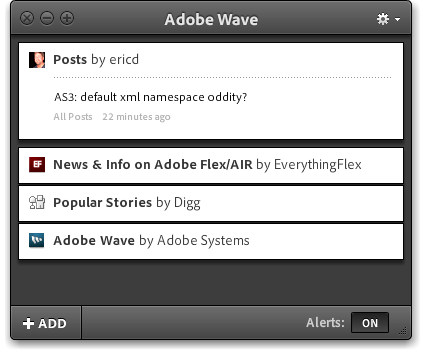
I don't know why, but when I don't declare it again for the second object, I can't parse it normally. If I do set that namespace again for the second XML object, I can parse it just fine.
That seems really strange to me. Maybe I need to read up a little more on this little furry creature.
Test dynamic post from the witch (3)
2 Comments
Test 1 2 3. Hopefully this works as I don't like spamming aggres. Okay, kicked the tires, this seems tight.
RSS witch (evaluator) near completion [Wave]
0 Comments
Update:
I have tested this out and it's working just fine. Of course if I change the title of a post, you'll get another notification for that item. I think that's fair enough as that will probably almost never happen.
 After a little bit of work I seem to have created something that will automate Wave notifications from here. If you've added my feed, you should automatically receive a notification within a few minutes of this (*this) post actually being posted.
The witch evaluates my RSS feed on intervals and if there are new items, it uses that information in those entries to generate new notifications. There really isn't anything too fancy about it, but I hope it works out well.
I spent WAY too much time wresting with E4X parsing only because I forgot that I am dealing with a namespace and I thought I was going absolutely crazy. Anyway, I hope that this thing works, if you're at all interested in one of these for yourself (if you have a feed of your own), perhaps I'll release it.
All you'd need to do is set up your dynamic publishing and populate a POST variables with your username, password, and topic. Of course the title and link are dynamically discerned and used for the notification(s).
I am not sure how quick I can make calls for notifications, so a 30 second delay between them seems safe enough.
I have tested this out and it's working just fine. Of course if I change the title of a post, you'll get another notification for that item. I think that's fair enough as that will probably almost never happen.
The witch evaluates my RSS feed on intervals and if there are new items, it uses that information in those entries to generate new notifications. There really isn't anything too fancy about it, but I hope it works out well.
I spent WAY too much time wresting with E4X parsing only because I forgot that I am dealing with a namespace and I thought I was going absolutely crazy. Anyway, I hope that this thing works, if you're at all interested in one of these for yourself (if you have a feed of your own), perhaps I'll release it.
All you'd need to do is set up your dynamic publishing and populate a POST variables with your username, password, and topic. Of course the title and link are dynamically discerned and used for the notification(s).
I am not sure how quick I can make calls for notifications, so a 30 second delay between them seems safe enough.
Wednesday, July 22, 2009
Dynamic notification after posting
Wednesday, July 22, 2009
1 Comments
I just wasted a whole lot of time, and I'll tell you exactly what I did. As you may have read, I have set up dynamic Wave notifications - I can easily produce them without going to the Publisher Portal. And that's a really great and flexible thing. However it doesn't help me with Blogger so much, so here is what I did, and then what I undid.
I use Blogger to FTP to my site, and I have no way of explicitly calling a script of any kind once a successful publishing action takes place. This includes even pinging. If Blogger hosted, at least I would get pinging by default. Anyway, what to do?
This is the first, convoluted road I took, successfully. But I had to just say no.
- One can supply up to ten email addresses to have posts emailed to once published when using Blogger. This is the only trigger I could think of using. I can't see any other way to get a usable event. Okay, so I created an arcane email address on my site and used that to send new posts to.
- In Mail.app on OS X, one can create rules, and you can designate an AppleScript to run when an item matches the rule. This is pretty unique and quite useful.
- Have that script pull the Subject from the email as well as the contents of the email body for use later in the same script.
- Have Safari open to my form page already, and have the AppleScript use the subject and body of email and send it to the form in Safari and submit it.
Stupid. Really fragile and stupid. Did I say it's stupid? Yes I did, but it bears repeating. It works. But it's so taped together that I wanted to throw up in my mouth because I even spent so much time on it. The AppleScript was pretty interesting though I must admit, at least I learned a little something there.
Then I thought of another tactic that I could take using a simple Flash or AIR application (headless? maybe).
- Launch the application and have it read the contents of my RSS feed. Take an initial read of my RSS file.
- Have the application cycle ping that RSS file every 5 minutes or so and compare the previous read to the current, if it's different discern how many items are different, and then post notification(s) for each one (using data from the XML for each item to build the notification) to my server to then end up at Adobe's server for delivery.
That's a pretty decent solution, although it's still a hack to be honest. Perhaps I'll use this... but I wish that I could just be able to call a script from Blogger to begin with to make all of this really easy.
Labels: Adobe Wave, Blogger
Adobe Wave: Creating dynamic notifications (Broadcast, not using the Publisher Portal)
0 Comments

The water is refreshing and with a little effort you can create a splash using Adobe Wave without the need of going to the Publisher Portal to get the job done (once it's set up properly).
This post assumes the use of PHP. Other technologies, you're on your own.
The first thing you'll need to do is to obtain an API token used for authentication. Adobe has provided a URL for you to use: https://id-wave.adobe.com/identity/1.0/auth/apitoken.xml.
Cool, now all you need to do is make a little form to POST to that URL and it will return XML back to you containing your token.
<form action=
"https://id-wave.adobe.com/identity/1.0/auth/apitoken.xml"
method="post">
 <input type="text" name="username"/>
 <input type="text" name="password"/>
 <input type="submit" name="submit" id="submit" id="Submit"/>
</form>
I broke the form action line into 3 so it all fit correctly in a modern browser (the column gutter was clipping it). That was easy, you should get a really long string of characters that represents your token (if you entered your credentials correctly into the form). Now that you have your token, you can set up dynamic notifications.
Adobe supplied a samples folder of PHP scripts (zip file).
Upload those somewhere on your server or locally, whatever, and you'll want to edit that apiToken.php file. Where it has $api_token=''; you will want to replace that empty string with your actual token string. You shouldn't need to touch anything else in that file.
Now, to use that notification.php file you uploaded to create your notification, I made another form that contains my "topic" URI. It looks like this:
<form action="http://theURL/notification.php" method="post">
<input type="hidden" name="topic" value="company_XX/feed_XX/XX"/>
Message: <input type="text" name="message" id="message"/><br/>
Link: <input type="text" name="link" id="link"/><br/>
<input type="submit" name="submit" id="submit" id="Submit"/>
</form>
The magic sauce here is the hidden topic parameter sent to the notification.php file. This is the "topic" or the feed you wish to broadcast your notification to. You can get this from your Publisher Portal account for said feed.
Of note: You can also send along a thumbnail (in my case I have chosen not to because I have yet to see one of my notifications accompanied by a declared file I specified). It uses the name of "image" (base64 encoded image data of 40x40 preferred), as well as "imagetype" (of either "image/jpeg" or "image/png").
If you had many feeds, you could always slap the URIs into a drop down menu, or provide that UI in your Flash/Flex/etc.
Now, when you call that notification.php file correctly with your form (or perhaps with triggers you set up for your blog, your application, etc.), it communicates with Adobe and your notification is blasted. It works well.
I don't see a return notification other than I don't get an HTTP status error when it works. I could be overlooking something though.
So in short, this is how you can wire up dynamic notifications for your applications, your blog (posting, etc.), and more without having to visit the Wave Publisher Portal. If I missed something in this post, I apologize and will remedy it. I have gotten this to work all the time and it wasn't too hard to set up (some trial and error did take place however).
And yes, that wave image has free usage rights (thanks Google for adding that kind of detail in advanced image search).
Labels: Adobe Wave
Adobe Wave integration here
4 Comments
I have decided to try my hand at this Adobe Wave technology and I have integrated it here at my blog.
If this doesn't work, below the header above, near the search box you'll find the link to display/hide the installation badge.
When you click on the badge, if you have Wave installed, you'll add my channel and receive notifications from me. If you have the AIR runtime but not Wave, you'll get Wave and my channel. No AIR, you'll get all three.
This is a pretty interesting technology, kind of like a more focused Twitter.
You should give the technology a go (link to Wave on Labs), it's a lot of fun.
If this doesn't work, below the header above, near the search box you'll find the link to display/hide the installation badge.
When you click on the badge, if you have Wave installed, you'll add my channel and receive notifications from me. If you have the AIR runtime but not Wave, you'll get Wave and my channel. No AIR, you'll get all three.
This is a pretty interesting technology, kind of like a more focused Twitter.
You should give the technology a go (link to Wave on Labs), it's a lot of fun.
Labels: Adobe Wave
Tuesday, July 21, 2009
Tags in Objective-C are like instances in AS3. Not really.
Tuesday, July 21, 2009
3 Comments
I have come to love tag properties in Objective-C, tagging UI elements for identification later, etc. I suppose I do this because I have been a Flash designer and developer for so long it's just burned into a part of my brain that can't be healed. No problem.
Tags in Objective-C are integers however.
I have witnessed the big push for Obj-C to be very verbose in regards to property names, method arguments, argument names, etc. I mean, it borders ridiculous at times, but I get the whole legibility part of it. Autocomplete in Xcode is pretty sweet, so it can usually keep up without pissing me off too much.
Over time I'm sure to like it even more. In AS, we are told to keep the names understandable but as short as possible to speed up lookups. Cool. I digress.
In regards to overall code legibility, instance names in Flash beat the pants off an Obj-C element's integer tag property. What is more descriptive: Button_0 or a tag value of 0? I'd say the former. You could always set up hash tables, and ultimately perhaps that's the right way to go. I am a little curious why the tag - perhaps it's a speed issue ultimately to avoid a String lookup.
Anyway, they are indeed useful and I like using them. ...Back to tagging some stuff.
Tags in Objective-C are integers however.
I have witnessed the big push for Obj-C to be very verbose in regards to property names, method arguments, argument names, etc. I mean, it borders ridiculous at times, but I get the whole legibility part of it. Autocomplete in Xcode is pretty sweet, so it can usually keep up without pissing me off too much.
Over time I'm sure to like it even more. In AS, we are told to keep the names understandable but as short as possible to speed up lookups. Cool. I digress.
In regards to overall code legibility, instance names in Flash beat the pants off an Obj-C element's integer tag property. What is more descriptive: Button_0 or a tag value of 0? I'd say the former. You could always set up hash tables, and ultimately perhaps that's the right way to go. I am a little curious why the tag - perhaps it's a speed issue ultimately to avoid a String lookup.
Anyway, they are indeed useful and I like using them. ...Back to tagging some stuff.
Labels: Objective-C, tag
iPhone: Question: Setting lots of UIButtons?
1 Comments
I am playing around with UIScrollView and one of the things I am doing is loading it up with a large image that one can pan around and zoom in and out of. That part is done and was easy. Now, I'd like to add hot spots to that image and the easiest way I've initially thought to do that is by setting custom buttons on top of it.
What I really wanted to do was to create a really wide view that contains my image and would allow me to place my UIButtons by hand on top, but when using IB for the iPhone, you can't stretch a View out wider than the screen. Even if I can do that with code when it loads up, I still can't place those buttons by hand. At least I don't think that one can. I haven't seen how, and it would be a really nice enhancement feature somehow if one could with a special View XIB or something.
Anyway, I have a bunch of hotspots that I need to place. Currently it's awfully tedious and it's being done one at a time by hand. I am wondering if I should write a method that takes x, y, width, height, and just loops through an array and places these one at a time in the method.
I am not exactly sure how I would set that up in Obj-C yet at the moment, but it must be close to AS3 in doing so. My current pseudo-code:
To be able to layout a really big view somehow would be a big plus instead of nailing down all the positions by hand.
What I really wanted to do was to create a really wide view that contains my image and would allow me to place my UIButtons by hand on top, but when using IB for the iPhone, you can't stretch a View out wider than the screen. Even if I can do that with code when it loads up, I still can't place those buttons by hand. At least I don't think that one can. I haven't seen how, and it would be a really nice enhancement feature somehow if one could with a special View XIB or something.
Anyway, I have a bunch of hotspots that I need to place. Currently it's awfully tedious and it's being done one at a time by hand. I am wondering if I should write a method that takes x, y, width, height, and just loops through an array and places these one at a time in the method.
I am not exactly sure how I would set that up in Obj-C yet at the moment, but it must be close to AS3 in doing so. My current pseudo-code:
UIImage *image = [[UIImage alloc] initWithContentsOfFile:[[NSBundle mainBundle] pathForResource:@"zooeyDeschanel" ofType:@"png"]];I guess I am looking for a way to construct that loop. Probably shouldn't be too hard, but I wonder if there is a better way than floating the buttons above the image in the scroll view to begin with.
imageView = [[UIImageView alloc] initWithImage:image];
myScrollView.contentSize = CGSizeMake(imageView.frame.size.width, imageView.frame.size.height);
myScrollView.maximumZoomScale = 6.0;
myScrollView.minimumZoomScale = 1.0;
myScrollView.clipsToBounds = YES;
myScrollView.delegate = self;
UIButton *but = [UIButton buttonWithType:UIButtonTypeCustom];
but.frame = CGRectMake( 0, 0, 50, 50 );
but.tag = 0;
[but setTitle:@"Test" forState:UIControlStateNormal];
[but addTarget:self action:@selector(displayValue:) forControlEvents:UIControlEventTouchUpInside];
UIButton *but2 = [UIButton buttonWithType:UIButtonTypeCustom];
but2.frame = CGRectMake( 200, 0, 50, 50 );
but2.tag = 1;
[but2 setTitle:@"Test 2" forState:UIControlStateNormal];
[but2 addTarget:self action:@selector(displayValue:) forControlEvents:UIControlEventTouchUpInside];
//... repeat this over and over
[myScrollView addSubview:imageView];
[myScrollView addSubview:but];
[myScrollView addSubview:but2];
To be able to layout a really big view somehow would be a big plus instead of nailing down all the positions by hand.
Labels: Objective-C, UIScrollView
Open Source Media Framework
0 Comments
Adobe Systems Incorporated (Nasdaq:ADBE) today announced two new Adobe® Flash® Platform open source initiatives for developers, media companies and publishers. Open Source Media Framework (OSMF), part of the project previously code named Strobe, enables developers to quickly and easily build more robust, feature-rich media players optimized for the Adobe Flash Platform.
The Text Layout Framework (TLF) will help developers bring sophisticated typography capabilities to Web applications. Both OSMF and TLF are now freely available as open source software, helping content owners extend their online media efforts as they look to create new business opportunities and monetization strategies for publishing on the Web.
The Text Layout Framework (TLF) will help developers bring sophisticated typography capabilities to Web applications. Both OSMF and TLF are now freely available as open source software, helping content owners extend their online media efforts as they look to create new business opportunities and monetization strategies for publishing on the Web.
Open Source Media Framework complements and solidifies Akamai's Open Video Player initiative," said Tim Napoleon, chief strategist, of digital media at Akamai. "OSMF leverages code from Akamai's Open Video Player and Adobe's expertise and resources to assist media companies and publishers in redefining the benchmarks for online video experiences that are powered by standards based workflows.Akamai & Adobe Collaboration
- OSMF is the open source part of the Strobe project that enables easy-to-build media players optimized for the Adobe Flash Platform
- The flexible OSMF architecture enables developers to easily create unique playback experiences that can leverage plug-ins for advertising, reporting metrics and content delivery along with standard video player features such as playback controls, video navigation, buffering and Dynamic Streaming. OSMF provides standard functionality along with plug-ins from third parties so content providers have the flexibility to adapt monetization strategies to specific content and the needs of their audiences.
- OSMF includes an API for partners to build plug-ins for value-add services. OSMF will enable more innovation around media experiences on the Web by allowing partners to easily experiment with new services for content providers, which spans content delivery, presentation and monetization.
- OSMF source code and pluggable software components are available immediately under the Mozilla Public License and available atwww.OpenSourceMediaFramework.com.
Akamai has joined Adobe to advance the industry toward a widely adopted, cohesive standard for media players that support Adobe Flash Platform technologies. Akamai and Adobe are collaborating on the Open Video Player initiative, previously founded by Akamai, and the release of OSMF technologies. The goal is to ensure a consistent framework for media player development that enables developers, publishers, content owners, corporations and others to more quickly and easily build new video players that create and sustain profitable new business models. By providing all the components for media player development, the combined efforts will help strengthen the industry shift towards open standards.
Labels: OSMF
Sunday, July 19, 2009
Sometimes older technology == better
Sunday, July 19, 2009
0 Comments
Sometimes older technology is better by far.
1. Shaving systems.
For years I have spent many hundreds of dollars on the Best A Man Can Get from Gillette. Now, I have an unusual beard, it's pretty thick and I get five o'clock shadow at noon. I bought into the whole thing and for the most part the results have been lackluster.
When my Dziadzia passed away, I got one of his straight razors. I've always been afraid to try it... for nostalgic reasons and for fear of carving my face into pieces. However, recently I've read up on proper use, and even knowing it's not as sharp as it's supposed to be (note: I could still neuter a gnat with this thing), I have never gotten a shave this close. Not even remotely close.
It's going to be the straight razor for me all the way now. It takes a little more time, but ultimately it is so worth it. I won't get five o'clock shadow until nearly 7PM now. I'll be getting this razor sharpened and possibly look for another. I'll stick with a sharpening service to get the job done, as this is a critical step I have no experience with (except for things like a Kabar fighting knife where you can be off a little bit). You don't sharpen a razor with a strop, only remove the burrs, FYI.
2. Writing instruments.
Nothing beats a technical pencil for the kind of work that I do when I need to make notes in my moleskin, but as far as an inked writing system goes... nothing beats a quality fountain pen.
The heft makes long writing sessions tolerable, the nib and a quality ink are far more expressive that something you roll along on a papered surface. If I had the time and the patience I would use a bottled ink and a dip pen... I used to make pen & ink drawings this way and the accuracy was always astounding on a heavier weight, clayed surface.
It's always good to turn back the clock and find things that withstand the test of time and technology.
1. Shaving systems.
For years I have spent many hundreds of dollars on the Best A Man Can Get from Gillette. Now, I have an unusual beard, it's pretty thick and I get five o'clock shadow at noon. I bought into the whole thing and for the most part the results have been lackluster.
When my Dziadzia passed away, I got one of his straight razors. I've always been afraid to try it... for nostalgic reasons and for fear of carving my face into pieces. However, recently I've read up on proper use, and even knowing it's not as sharp as it's supposed to be (note: I could still neuter a gnat with this thing), I have never gotten a shave this close. Not even remotely close.
It's going to be the straight razor for me all the way now. It takes a little more time, but ultimately it is so worth it. I won't get five o'clock shadow until nearly 7PM now. I'll be getting this razor sharpened and possibly look for another. I'll stick with a sharpening service to get the job done, as this is a critical step I have no experience with (except for things like a Kabar fighting knife where you can be off a little bit). You don't sharpen a razor with a strop, only remove the burrs, FYI.
2. Writing instruments.
Nothing beats a technical pencil for the kind of work that I do when I need to make notes in my moleskin, but as far as an inked writing system goes... nothing beats a quality fountain pen.
The heft makes long writing sessions tolerable, the nib and a quality ink are far more expressive that something you roll along on a papered surface. If I had the time and the patience I would use a bottled ink and a dip pen... I used to make pen & ink drawings this way and the accuracy was always astounding on a heavier weight, clayed surface.
It's always good to turn back the clock and find things that withstand the test of time and technology.
Labels: old technology
I don't know about you, but...
5 Comments
I don't know about you, but I am ready for some AS3.1. Whatever that could be.
Labels: AS3
Friday, July 17, 2009
iPhone: External Accessory Framework snippets
Friday, July 17, 2009
17 Comments
I do not have any immediate plans to play around with this and I don't have any hardware or the protocol knowledge to do so with anything, but I was reading up on the External Accessory Framework that comes with the OS3.0 SDK.
Some information, but I didn't see any sample projects (for obvious reasons) or code snippets anywhere until just now. I'm not sure if this stuff is up to date or not, but here you go.
Add the ExternalAccessory.framework to your project. Make sure to add #import <ExternalAccessory/ExternalAccessory.h> to your .m file, and this is some example code:
Add the ExternalAccessory.framework to your project. Make sure to add #import <ExternalAccessory/ExternalAccessory.h> to your .m file, and this is some example code:
- (EASession *)openSessionForProtocol:(NSString *)protocolString {
   NSArray *accessories = [[EAAccessoryManager sharedAccessoryManager]
      connectedAccessories];
   EAAccessory *accessory = nil;
   EASession *session = nil;

   for (EAAccessory *obj in accessories) {
       if ([[obj protocolStrings] containsObject:protocolString]){
           accessory = obj;
           break;
       }
   }

   if (accessory){
       session = [[EASession alloc] initWithAccessory:accessory
            forProtocol:protocolString];
       if (session) {
           [[session inputStream] setDelegate:self];
           [[session inputStream] scheduleInRunLoop:[NSRunLoop currentRunLoop]
           forMode:NSDefaultRunLoopMode];
           [[session inputStream] open];
           [[session outputStream] setDelegate:self];
           [[session outputStream] scheduleInRunLoop:[NSRunLoop currentRunLoop]
            forMode:NSDefaultRunLoopMode];
           [[session outputStream] open];
           [session autorelease];
       }
   }
   return session;
}

// Handle communications from the streams.
- (void)stream:(NSStream*)theStream handleEvent:(NSStreamEvent)streamEvent
{
   switch (streamEvent)
   {
       // case NSStreamHasBytesAvailable: this was incorrect in Apple documentation...
       case NSStreamEventHasBytesAvailable:
           // Process the incoming stream data.
           break;
        case NSStreamEventHasSpaceAvailable:
           // Send the next queued command.
           break;
        default:
           break;
   }
}
Enjoy. This is here merely as a kind of reference.Labels: ExternalAccessory, iPhone, Objective-C
Thursday, July 16, 2009
iPhone Book: Beginning iPhone 3 Development (hold the phone)
Thursday, July 16, 2009
0 Comments

I printed tons of pages found on the internet, and I also purchased a few books on the subject. I keep two on my desk at all times: Beginning iPhone Development (Exploring the iPhone SDK) by Dave Mark and Jeff LaMarche, and The iPhone Developer's Cookbook.
I refer to them every now and then in case I forget something pretty silly and need a quick reference. And yes, I am also guilty of opening up previous Projects looking for techniques I used before that I want to employ again. I just did that twenty minutes ago.
 I'm sure I'll do it again before the close of the day.
But what's the point of this post? You see, the Beginning iPhone 3 Development book is new, but it's not completely new. A little sprinkling of Core Data has been added and some Table View styling. That's about it.
If you are into the new stuff in the 3.0 SDK (GameKit, MapKit, Push Notifications, In-App Purchase, more Core Data, etc.) then you want to wait for the book from the same guys to be called More iPhone 3 Development. So check Amazon every now and then. These guys put together really fine books, so you'll be well-served. Just don't get the new one they just put out thinking it's going to cover SDK 3.0 in any great detail.
Thank you Ultrashock!
0 Comments

Ultrashock has been building Ultrashock version 3 behind the scenes, and to get interest up and drive some traffic their way, they are randomly picking 10 followers for retweet "RT: @Ultrashock: Prop3D rocks!" - and each winner receives the Prop3D bundle. You can check the bundle itself out right here. It costs 100 credits, whatever that means.
They are pretty cool 3D widgets for sure.
I was the second winner chosen so far and just downloaded the bundle. They had a typo in the shortened URL, which I easily fixed to get the link working. It's http://bit... and not http://biy...
I was the second winner chosen so far and just downloaded the bundle. They had a typo in the shortened URL, which I easily fixed to get the link working. It's http://bit... and not http://biy...
Thanks guys!
Wednesday, July 15, 2009
iPhone: Previous example with touches
Wednesday, July 15, 2009
0 Comments
I just wanted to update my previous post in regards to an iPhone application that allows one to step through images as a presentation to a potential/current client, etc. So all I've really done here is added swiping left and right with a small allowance for vertical changes.
#import "ClickThroughViewController.h"
#import <QuartzCore/QuartzCore.h>

@implementation ClickThroughViewController
@synthesize imageView, imageViewTop, aboutView, aboutButton,
   advanceButton, backButton, label, gestureStartPoint, dirString;

- (void)updateLabel {
 NSString *c = [[NSString alloc] initWithFormat:@"%i", count];
 label.text = c;
 [c release];
}

- (void)touchesBegan:(NSSet *)touches withEvent:(UIEvent *)event {
 UITouch *touch = [touches anyObject];
 gestureStartPoint = [touch locationInView:self.view];
 dirString = NULL;
}

- (void)touchesMoved:(NSSet *)touches withEvent:(UIEvent *)event {
 UITouch *touch = [touches anyObject];
 CGPoint currentPosition = [touch locationInView:self.view];
 if(fabsf(gestureStartPoint.x - currentPosition.x ) >= kMinimumGestureLength && fabsf(gestureStartPoint.y - currentPosition.y) <= kMaximumVariance){
  //Horizontal Swipe
  if( gestureStartPoint.x < currentPosition.x ){
   dirString = @"fromLeft";
  } else {
   dirString = @"fromRight";
  }
 }
}

- (void)touchesEnded:(NSSet *)touches withEvent:(UIEvent *)event {
 if( [dirString isEqualToString:@"fromLeft"] ){
  [self prevImage];
 } else if( [dirString isEqualToString:@"fromRight"]){
  [self nextImage];
 }
}

/*
 You need to make sure the prototype images that you use are JPGs
 and use the "image_" convention, otherwise the total count will
 be off and your application will bork.
*/
- (void)viewDidLoad {

 UIImage *img = [UIImage imageWithContentsOfFile:[[NSBundle mainBundle] pathForResource:@"image_1.jpg" ofType:nil]];
 UIImage *img2 = [UIImage imageWithContentsOfFile:[[NSBundle mainBundle] pathForResource:@"image_1.jpg" ofType:nil]];
 imageView.image = img2;
 imageViewTop.image = img;
 imageView.hidden = YES;
 totalCount = 0;
 aboutShowing = NO;

 NSArray *d = [[NSBundle mainBundle] pathsForResourcesOfType:@"jpg" inDirectory:nil];
 for(NSString *s in d){
  if([[s lastPathComponent] hasPrefix:@"image_"]){
   totalCount++;
  }
 }
 count = 1;
 prev = totalCount;
 label.alpha = 0;

 [self updateLabel];
    [super viewDidLoad];
}

- (void)didReceiveMemoryWarning {
    [super didReceiveMemoryWarning];
}

- (void)dealloc {
 [imageView release];
 [backButton release];
 [advanceButton release];
    [super dealloc];
}

// #pragma isn't very cool in my opinion, so...
//MARK: Custom Code

- (IBAction)advanceImage:(id)sender {
 [self nextImage];
}

- (void)nextImage {
 count++;
 if( count > totalCount ){
  count = 1;
 }
 if( count == 1 ){
  prev = totalCount;
 } else {
  prev = count - 1;
 }
 [self updateLabel];

 NSString *tmp = [[NSString alloc] initWithFormat:@"image_%i", count];
 NSString *old = [[NSString alloc] initWithFormat:@"image_%i", prev];
 UIImage *img = [UIImage imageWithContentsOfFile:[[NSBundle mainBundle] pathForResource:tmp ofType:@"jpg"]];
 UIImage *img2 = [UIImage imageWithContentsOfFile:[[NSBundle mainBundle] pathForResource:old ofType:@"jpg"]];

 imageView.image = img2;
 imageViewTop.image = img;
 label.alpha = 1;

 CGContextRef context = UIGraphicsGetCurrentContext();
 [UIView beginAnimations:nil context:context];
 [UIView setAnimationTransition:UIViewAnimationTransitionFlipFromRight forView:[self imageViewTop] cache:YES];
 [UIView setAnimationDuration:0.5];
 [UIView commitAnimations];

 CGContextRef context2 = UIGraphicsGetCurrentContext();
 [UIView beginAnimations:nil context:context2];
 [UIView setAnimationDuration:1.0];
 label.alpha = 0;
 [UIView commitAnimations];
}

- (IBAction)aboutChange:(id)sender {
 if( !aboutShowing ){
  aboutShowing = YES;
  aboutView.hidden = NO;
  aboutView.frame = CGRectMake(0, -50, 320, 480);
  aboutView.alpha = 0.0;
  CGContextRef context = UIGraphicsGetCurrentContext();
  [UIView beginAnimations:nil context:context];
  [UIView setAnimationDuration:1.0];
  aboutView.frame = CGRectMake(0, 0, 320, 480);
  aboutView.alpha = 1.0;
  [UIView commitAnimations];

 } else {
  aboutShowing = NO;
  CGContextRef context2 = UIGraphicsGetCurrentContext();
  [UIView beginAnimations:nil context:context2];
  [UIView setAnimationDuration:1.0];
  aboutView.frame = CGRectMake(0, -50, 320, 480);
  aboutView.alpha = 0.0;
  [UIView commitAnimations];
 }
}

- (IBAction)backImage:(id)sender {
 [self prevImage];
}

- (void)prevImage {
 count--;
 if( count < 1 ){
  count = totalCount;
 }
 if( count == 1 ){
  prev = totalCount;
 } else {
  prev = count + 1;
 }
 [self updateLabel];
 NSString *tmp = [[NSString alloc] initWithFormat:@"image_%i", count];
 NSString *old = [[NSString alloc] initWithFormat:@"image_%i", prev];
 UIImage *img = [UIImage imageWithContentsOfFile:[[NSBundle mainBundle] pathForResource:tmp ofType:@"jpg"]];
 UIImage *img2 = [UIImage imageWithContentsOfFile:[[NSBundle mainBundle] pathForResource:old ofType:@"jpg"]];
 imageView.image = img2;
 imageViewTop.image = img;
 label.alpha = 1;

 CGContextRef context = UIGraphicsGetCurrentContext();
 [UIView beginAnimations:nil context:context];
 [UIView setAnimationTransition:UIViewAnimationTransitionFlipFromLeft forView:[self imageViewTop] cache:YES];
 [UIView setAnimationDuration:0.5];
 [UIView commitAnimations];

 CGContextRef context2 = UIGraphicsGetCurrentContext();
 [UIView beginAnimations:nil context:context2];
 [UIView setAnimationDuration:1.0];
 label.alpha = 0;
 [UIView commitAnimations];
}

@end
Labels: iPhone, Objective-C
Text Layout Framework
2 Comments
Adobe Labs has been producing weekly builds of their Text Layout Framework (making them available on Fridays), allowing for sophisticated and innovative typography within Flash.
I can remember years and years of developers and designer bitching about the lack of support for RTL, etc. and I am wondering if any are actually involved in flushing some of this functionality into their projects or work?
There is even a component available to work within Flash CS4 to aid in the setup of Text Layout Framework utilization.
If you forgot about this stuff, head on over.
I can remember years and years of developers and designer bitching about the lack of support for RTL, etc. and I am wondering if any are actually involved in flushing some of this functionality into their projects or work?
There is even a component available to work within Flash CS4 to aid in the setup of Text Layout Framework utilization.
If you forgot about this stuff, head on over.
Labels: AS3, Flash, Text Layout Framework
Monday, July 13, 2009
iPhone: Voices That Matter iPhone Developers Conference
Monday, July 13, 2009
0 Comments
If you are in the Boston area, there is an iPhone developers conference taking place at the MCLE Conference Center in Boston October 17-18th. The early bird price (until September 12) is $495, after that the price jumps to $695.
You can check out details of the conference right here. Just to get you're nether bits in an excited state, Aaron Hillegass is delivering the Saturday keynote and Andy Ihnatko is delivering a talk on Sunday. Topics include:
You can check out details of the conference right here. Just to get you're nether bits in an excited state, Aaron Hillegass is delivering the Saturday keynote and Andy Ihnatko is delivering a talk on Sunday. Topics include:
- Custom User Interfaces with Core Animation
- Data Sync
- Designing a Killer UI
- iPhone View Controllers
- Peer to Peer Networking
- Cocoa Design Patterns
- Core Data
- Open GL ES for General Applications
- Rapid Application Delivery: Going Hybrid
- Accelerometer
- Audio and OpenAL
- Core Location
- Cameras and Photos
Labels: Conference, iPhone
AS3: TrueTimer from Gritfish
1 Comments
Gritfish's TrueTimer class is something that attempts to tackle the inaccuracy of the built-in Timer class. Run over and read his post and see the class, or you can check it out here as well. I have not yet implemented this in anything, it seems that when you receive a Timer event, you're going to have to read the classes public variables instead of getting them from the Timer event object itself. Which is fine I guess.
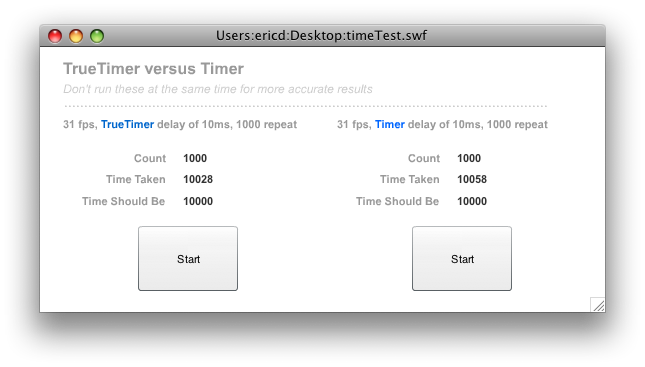
A quick use example (make sure your listener method is using type of Event and not TimerEvent though - I ran into that myself for a minute).
A quick use example (make sure your listener method is using type of Event and not TimerEvent though - I ran into that myself for a minute).
var myTimer:TrueTimer = new TrueTimer( 100, 100 );And here is the base class itself:
myTimer.addEventListener( TimerEvent.TIMER, onMyTimer );
function onMyTimer( e:Event ):void {
//you can't use the e.currentTarget.currentCount or anything like that
trace( myTimer.currentCount );
}
package {
 import flash.display.*
 import flash.events.*
 import flash.utils.*
 public class TrueTimer extends MovieClip {
  public var delay:int
  public var repeatCount:int
  public var initTime:Date
  public var currentTime:Date
  public var currentCount = 0
  public var __offset:int = 0
  public var running:Boolean = false
  public var timeFromStart = 0
  public var timeShouldBe = 0

  public function TrueTimer(DELAY,REPEAT){
   delay = DELAY
   repeatCount = REPEAT

   initTime = new Date()
   currentTime = initTime
  }
  public function evaluateTime(e:Event){
   var now = new Date()
   var msDiff = now.valueOf() - currentTime.valueOf()
   __offset += msDiff
   currentTime = now
   if(__offset > delay){
    while(__offset > delay){
     currentCount ++
     __offset -= delay

     if(repeatCount != 0){
      if(currentCount == repeatCount){
       timeFromStart = now.valueOf() - initTime.valueOf()
       timeShouldBe = (repeatCount*delay)
       dispatchEvent(new Event(TimerEvent.TIMER))
       dispatchEvent(new Event(TimerEvent.TIMER_COMPLETE))
       __stop()
      }else if(currentCount < repeatCount){
       timeFromStart = now.valueOf() - initTime.valueOf()
       timeShouldBe = (repeatCount*delay)
       dispatchEvent(new Event(TimerEvent.TIMER))
      }
     }else{
      timeFromStart = now.valueOf() - initTime.valueOf()
      timeShouldBe = (repeatCount*delay)
      dispatchEvent(new Event(TimerEvent.TIMER))
     }
    }
   }
  }
  public function __start(){
   initTime = new Date()
   currentTime = initTime
   running = true
   addEventListener(Event.ENTER_FRAME,evaluateTime)
  }
  public function __stop(){
   running = false
   removeEventListener(Event.ENTER_FRAME,evaluateTime)
  }
  public function __clear(){
   currentCount = 0
   __offset = 0
   running = false
   removeEventListener(Event.ENTER_FRAME,evaluateTime)
  }
 }
}
Labels: AS3, Timer Class
Sunday, July 12, 2009
FlashDevelop 3.0.2 RTM Released
Sunday, July 12, 2009
0 Comments
FlashDevelop 3.0.2 RTM released
This release fixes issues found after 3.0.1. We added few options and fixed some issues in the completion and the UI. Enjoy!
About FlashDevelop:
* Features
* Screenshots
Note to customizers:
This release is fully compatible with RC2 - 3.0.1 RTM.
List of changes:
* Find and replace regex engine fixed
* TraceManager now resist message flooding
* Start Menu group creation is now optional
* Script errors are now ignored by the browser control
* Completion now shows local "Class" vars after new keyword
* Option added to generarate code always with access modifiers
* Option added to disable haXe compiler based completion
* Option added to disable the find text updating on F3
* Other small completion and UI bug fixes
Future plans:
* Finish the one of the debuggers, investigate profiling.
* Implement class imports reorganisation and packages refactoring.
* Add HTML/JS projects, investigate Jangaroo AS to JS compilation.
* Evaluate the possible cross-platform implementation.
* Make the MXML completion actually smart.
Important:
* Get the debug Flash Player (You need: Projector and ActiveX)
* Get Adobe Flex 3 SDK. The free Flex SDK (2 or 3) is required for ActionScript 3 development if you don't use Flash CS3.
* Java 1.6+ is required for the Flex compiler (ActionScript 3).
 If you think the program is good, please donate some money for this project.
Download:
Built from rev. 612
Download FlashDevelop 3.0.2 RTM
About FlashDevelop:
* Features
* Screenshots
Note to customizers:
This release is fully compatible with RC2 - 3.0.1 RTM.
List of changes:
* Find and replace regex engine fixed
* TraceManager now resist message flooding
* Start Menu group creation is now optional
* Script errors are now ignored by the browser control
* Completion now shows local "Class" vars after new keyword
* Option added to generarate code always with access modifiers
* Option added to disable haXe compiler based completion
* Option added to disable the find text updating on F3
* Other small completion and UI bug fixes
Future plans:
* Finish the one of the debuggers, investigate profiling.
* Implement class imports reorganisation and packages refactoring.
* Add HTML/JS projects, investigate Jangaroo AS to JS compilation.
* Evaluate the possible cross-platform implementation.
* Make the MXML completion actually smart.
Important:
* Get the debug Flash Player (You need: Projector and ActiveX)
* Get Adobe Flex 3 SDK. The free Flex SDK (2 or 3) is required for ActionScript 3 development if you don't use Flash CS3.
* Java 1.6+ is required for the Flex compiler (ActionScript 3).
If you think the program is good, please donate some money for this project. Download:
Built from rev. 612
Download FlashDevelop 3.0.2 RTM
Labels: AS3, Flash, FlashDevelop
Friday, July 10, 2009
iPhone: Easy step through presentation application
Friday, July 10, 2009
2 Comments
This does not account for left and right swiping, but it could be added easily. Have a bunch of photos that you'd like to show someone in a presentation? Perhaps mock-ups of layouts, etc. This bit can really help you along. I wrote this quickly but it works pretty well, even with some subtle and nice effects. You'll need to create two custom buttons that you'll hook up to backImage and advanceImage.
The code reads JPG images that use "image_" in their filename. That allows you just load up your project with the files you want and they end up in the bundle, available to you. You could tweak this to use online assets too if you really wanted.
Enjoy on this fine Friday.
ClickViewController.mThe code reads JPG images that use "image_" in their filename. That allows you just load up your project with the files you want and they end up in the bundle, available to you. You could tweak this to use online assets too if you really wanted.
Enjoy on this fine Friday.
#import "ClickThroughViewController.h"
#import <quartzcore/quartzcore.h>

@implementation ClickThroughViewController
@synthesize imageView, imageViewTop, aboutView, aboutButton, advanceButton, backButton, label;

- (void)updateLabel {
NSString *c = [[NSString alloc] initWithFormat:@"%i", count];
label.text = c;
[c release];
}

/*
You need to make sure the prototype images that you use are JPGs
and use the "image_" convention, otherwise the total count will
be off and your application will bork.
*/
- (void)viewDidLoad {
UIImage *img = [UIImage imageWithContentsOfFile:[[NSBundle mainBundle] pathForResource:@"image_1.jpg" ofType:nil]];
UIImage *img2 = [UIImage imageWithContentsOfFile:[[NSBundle mainBundle] pathForResource:@"image_6.jpg" ofType:nil]];
imageView.image = img2;
imageViewTop.image = img;
imageView.hidden = YES;
totalCount = 0;
aboutShowing = NO;

NSArray *d = [[NSBundle mainBundle] pathsForResourcesOfType:@"jpg" inDirectory:nil];
for(NSString *s in d){
 if([[s lastPathComponent] hasPrefix:@"image_"]){
  totalCount++;
 }
}
count = 1;
prev = totalCount;
label.alpha = 0;
[self updateLabel];
   [super viewDidLoad];
}

- (void)didReceiveMemoryWarning {
   [super didReceiveMemoryWarning];
}

- (void)dealloc {
[imageView release];
[backButton release];
[advanceButton release];
   [super dealloc];
}

// #pragma isn't very cool in my opinion, so...
//MARK: Custom Code

- (IBAction)advanceImage:(id)sender {
count++;
if( count > totalCount ){
 count = 1;
}
if( count == 1 ){
 prev = totalCount;
} else {
 prev = count - 1;
}
[self updateLabel];

NSString *tmp = [[NSString alloc] initWithFormat:@"image_%i", count];
NSString *old = [[NSString alloc] initWithFormat:@"image_%i", prev];
UIImage *img = [UIImage imageWithContentsOfFile:[[NSBundle mainBundle] pathForResource:tmp ofType:@"jpg"]];
UIImage *img2 = [UIImage imageWithContentsOfFile:[[NSBundle mainBundle] pathForResource:old ofType:@"jpg"]];

imageView.image = img2;
imageViewTop.image = img;
label.alpha = 1;

CGContextRef context = UIGraphicsGetCurrentContext();
[UIView beginAnimations:nil context:context];
[UIView setAnimationTransition:UIViewAnimationTransitionFlipFromLeft forView:[self imageViewTop] cache:YES];
[UIView setAnimationDuration:0.5];
[UIView commitAnimations];

CGContextRef context2 = UIGraphicsGetCurrentContext();
[UIView beginAnimations:nil context:context2];
[UIView setAnimationDuration:1.0];
label.alpha = 0;
[UIView commitAnimations];
}

- (IBAction)aboutChange:(id)sender {
if( !aboutShowing ){
 aboutShowing = YES;
 aboutView.hidden = NO;
 aboutView.frame = CGRectMake(0, -50, 320, 480);
 aboutView.alpha = 0.0;
 CGContextRef context = UIGraphicsGetCurrentContext();
 [UIView beginAnimations:nil context:context];
 [UIView setAnimationDuration:1.0];
 aboutView.frame = CGRectMake(0, 0, 320, 480);
 aboutView.alpha = 1.0;
 [UIView commitAnimations];

} else {
 aboutShowing = NO;
 CGContextRef context2 = UIGraphicsGetCurrentContext();
 [UIView beginAnimations:nil context:context2];
 [UIView setAnimationDuration:1.0];
 aboutView.frame = CGRectMake(0, -50, 320, 480);
 aboutView.alpha = 0.0;
 [UIView commitAnimations];
}
}

- (IBAction)backImage:(id)sender {
 count--;
 if( count < 1 ){
  count = totalCount;
 }
 if( count == 1 ){
  prev = totalCount;
 } else {
  prev = count + 1;
 }
 [self updateLabel];
 NSString *tmp = [[NSString alloc] initWithFormat:@"image_%i", count];
 NSString *old = [[NSString alloc] initWithFormat:@"image_%i", prev];
 UIImage *img = [UIImage imageWithContentsOfFile:[[NSBundle mainBundle] pathForResource:tmp ofType:@"jpg"]];
 UIImage *img2 = [UIImage imageWithContentsOfFile:[[NSBundle mainBundle] pathForResource:old ofType:@"jpg"]];
 imageView.image = img2;
 imageViewTop.image = img;
 label.alpha = 1;

 CGContextRef context = UIGraphicsGetCurrentContext();
 [UIView beginAnimations:nil context:context];
 [UIView setAnimationTransition:UIViewAnimationTransitionFlipFromRight forView:[self imageViewTop] cache:YES];
 [UIView setAnimationDuration:0.5];
 [UIView commitAnimations];

 CGContextRef context2 = UIGraphicsGetCurrentContext();
 [UIView beginAnimations:nil context:context2];
 [UIView setAnimationDuration:1.0];
 label.alpha = 0;
 [UIView commitAnimations];
}

@end
Labels: iPhone, Objective-C, Xcode
Thursday, July 9, 2009
AS3 Timer accuracy
Thursday, July 9, 2009
9 Comments
I've just bit into some weirdness. I have a Timer that I want to fire every 100th of a second. So it would be new Timer( 10, x ); However when testing this isn't not accurate (I am printing the time to the screen). So if I drop the Timer down to fire every 7ms instead of 10, it aligns with my watch, my computer, and my stop watch on my iPhone.
That's great, but what when I move this to another machine? It will probably be slightly off.
What is even stranger is that when I do new Timer( 7, 1800 ); - it still reaches 18 seconds, even though it should have fired a complete before that.
Is there a really accurate way of timing something as close to possible? I know this is a pretty old topic, maybe someone has found something really reliable.
[July 10th Update]
I have decided to fire on every 10th of second. I'm losing a bunch of timing control, but it wasn't accurate enough anyway. Instead of working on reading the system clock and making dynamic adjustments on the fly, I've decided that increasing the delay of the timer will work as it's now only off a tiny bit compared to before. Of course the longer it runs, the more it will be off, but my timer isn't going to run for a very long time, thankfully.
That's great, but what when I move this to another machine? It will probably be slightly off.
What is even stranger is that when I do new Timer( 7, 1800 ); - it still reaches 18 seconds, even though it should have fired a complete before that.
Is there a really accurate way of timing something as close to possible? I know this is a pretty old topic, maybe someone has found something really reliable.
[July 10th Update]
I have decided to fire on every 10th of second. I'm losing a bunch of timing control, but it wasn't accurate enough anyway. Instead of working on reading the system clock and making dynamic adjustments on the fly, I've decided that increasing the delay of the timer will work as it's now only off a tiny bit compared to before. Of course the longer it runs, the more it will be off, but my timer isn't going to run for a very long time, thankfully.
It still sucks, and while I can't expect any timer to be absolutely accurate for numerous reasons, I'd hope that in the future we're able to get something that is more precise, somehow, someway. FP11?
Labels: Timer Class
Flash is amazing, my quick random PSA
0 Comments
We all know it, and we've known it for a long time. Just about anything you want to do can be done using Flash Player 10. Sometimes we lose sight of the power of this technology when we're knee deep in the slop of application development and we're just focused on doing and getting the job done.
Today I had a moment when I stepped back from my desk and marveled at what I was doing. Not in that way. It's just that an hour before an idea had already formulated itself into a working, beautiful, and easy to use thing. Any kind of functionality I wanted to create simply happened and wasn't a struggle.
Flash is beautiful. To those whose only experience with it are those online advertisements... think about how lousy those advertisements would be without Flash. Think of the good ones you've seen that respected your audio space. The ones incorporating video and games and inclusion of dynamic data with cool visualizations.
Yes, sometimes people take it too far. But so what. It's all good. Enjoy the freedom to express yourself and do cool things. That's all for this PSA, back to work. Which I love.
Today I had a moment when I stepped back from my desk and marveled at what I was doing. Not in that way. It's just that an hour before an idea had already formulated itself into a working, beautiful, and easy to use thing. Any kind of functionality I wanted to create simply happened and wasn't a struggle.
Flash is beautiful. To those whose only experience with it are those online advertisements... think about how lousy those advertisements would be without Flash. Think of the good ones you've seen that respected your audio space. The ones incorporating video and games and inclusion of dynamic data with cool visualizations.
Yes, sometimes people take it too far. But so what. It's all good. Enjoy the freedom to express yourself and do cool things. That's all for this PSA, back to work. Which I love.
Wednesday, July 8, 2009
AS3 range slider with multiple thumbs?
Wednesday, July 8, 2009
11 Comments
Update 2:
Here is a quick example of the working component as it stands right now. Implements setting thumb positions and all that jazz.
Update:
I started coding up an AS3 quasi-component and it's working pretty well. It's kind of hard-coded for my immediate needs, but I may just release it so you can implement custom events for it and roll it as a proper component.
It doesn't look like the sample below, the thumbs carry along their current value based on the max value set for the whole slider, use color-coded sections to better help visualize, etc.
If I get some spare time, I'll probably roll it into a proper component since it's not too hard but rather time-consuming. As most things I suppose.
If you are at all interested in using a range (partition) slider outside of Flex (that doesn't require Flex at all), then you may want to pay a little extra attention to this blog in the near future.
If you've seen one of these around, please let me know. I am hoping to save development time for my actual application and not having to cut out some of that time to create a multi-range slider.
Yes, I know the use case for a slider that can support 2+ thumbs is rare. Any help would be appreciated.
Here is an image of a component I already started:

How I imagine it. The slider has a base min and max. Defaults to 1 thumb maybe. You can add thumbs and when you do you specify a value for it's initial placement.
How I imagine it. The slider has a base min and max. Defaults to 1 thumb maybe. You can add thumbs and when you do you specify a value for it's initial placement.
To make it easy, any time any of the thumbs are moved, values for all are set for the change event, in the order of the thumbs, say an array of values. You can't drag a thumb over another thumb.
iPhone: CorePlot
1 Comments
 There is an open-source graphing library available for both Mac OS X and the iPhone called CorePlot. If you've gotten accustomed to the graphing packages available for Flex and Flash applications, you'll get a little tingle when you see this graphic library.
In order to integrate into your iPhone application, after checking the code out of the repository or downloading you can follow this information:
Because frameworks cannot be used in Cocoa Touch applications in the same way as on the Mac, the means of including Core Plot within an iPhone application are slightly different.
First, drag the CorePlot-CocoaTouch.xcodeproj file into your iPhone application's Xcode project (making sure that nothing's copied and the paths are relative to your project). Then go to the Targets tab in Xcode, select your application's target, and bring up the inspector. Go to the General settings page and add the CorePlot-CocoaTouch library as a direct dependency.
Core Plot is built as a static library for iPhone, so you'll need to drag the libCorePlot-CocoaTouch.a static library from under the CorePlot-CocoaTouch.xcodeproj group to your target's Link Binary With Libraries folder.
You'll also need to point to the right header location. Under your Build settings, set the Header Search Paths to the relative path from your application to the framework/ subdirectory within the Core Plot source tree. Make sure to make this header search path recursive. You need to add -ObjC to Other Linker Flags as well.
Core Plot is based on Core Animation, so if you haven't already, add the QuartzCore framework to your application project.
Finally, you should be able to import all of the Core Plot classes and data types by inserting the following line in the appropriate source files within your project:
#import "CorePlot-CocoaTouch.h
I have yet to try this out myself since I don't immediately have a need for it, but I am seeing some people encountering problems with the steps outlined. They get a EXC_BAD_ACCESS error. Perhaps this library isn't set up in it's downloaded form properly and may require some tinkering to get it rolling properly. Here is the Issues List where you can tool around to see what problems currently exist that have been commented upon.
Raphaël—JavaScript Library: vector graphics on the web
1 Comments
I received a cool message from a friend of mine to go and check out the Raphaël—JavaScript Library. What is it? Here are the introductory paragraphs from their website:
It's as easy to implement as this. Include the raphael.js into your page and start having fun like so:
Raphaël is a small JavaScript library that should simplify your work with vector graphics on the web. If you want to create your own specific chart or image crop and rotate widget, for example, you can achieve it simply and easily with this library.
Raphaël uses the SVG W3C Recommendation and VML as a base for creating graphics. This means every graphical object you create is also a DOM object, so you can attach JavaScript event handlers or modify them later. Raphaël’s goal is to provide an adapter that will make drawing vector art compatible cross-browser and easy.
Raphaël currently supports Firefox 3.0+, Safari 3.0+, Opera 9.5+ and Internet Explorer 6.0
It's as easy to implement as this. Include the raphael.js into your page and start having fun like so:
// Creates canvas 320 × 200 at 10, 50There are plenty of demos to check out at the site, it looks pretty interesting to say the least.
var paper = Raphael(10, 50, 320, 200);
// Creates circle at x = 50, y = 40, with radius 10
var circle = paper.circle(50, 40, 10);
// Sets the fill attribute of the circle to red (#f00)
circle.attr("fill", "#f00");
// Sets the stroke attribute of the circle to white (#fff)
circle.attr("stroke", "#fff");
Labels: Javascript, Vector
Tuesday, July 7, 2009
Are you using Amazon's Product Advertising APIs? You could be in trouble.
Tuesday, July 7, 2009
0 Comments
If you are using Amazon's Product Advertising APIs in your iPhone application, guess what? You could be libel and be on the tail-end of some legal action.
You see, the APA APIs stipulate that use of the API is prohibited from use on a mobile device.
From the agreement: 4. Usage Requirements, (e):
So you might be in violation and not know it yet. I'd imagine an application with a small user footprint will probably go unnoticed. You may want to look into this if you are using Amazon's service.
You see, the APA APIs stipulate that use of the API is prohibited from use on a mobile device.
From the agreement: 4. Usage Requirements, (e):
You will not, without our express prior written approval requested via this link, use any Product Advertising Content on or in connection with any site or application designed or intended for use with a mobile phone or other handheld device.
So you might be in violation and not know it yet. I'd imagine an application with a small user footprint will probably go unnoticed. You may want to look into this if you are using Amazon's service.
Pennsylvania State of Champions
0 Comments

The city of Pittsburgh has reclaimed its reign as the "City of Champions" with the Steelers' Super Bowl XLIII title and Penguins' Stanley Cup victory just months removed from each other. But if you include the defending World Series Champion Philadelphia Phillies, the state of Pennsylvania could probably adopt the moniker "State of Champions."
In an unprecedented event, all three championship trophies - the Stanley Cup, the Lombardi Trophy and the World Series Trophy - were all on hand in Harrisburg Tuesday afternoon to commemorate the outstanding achievements of Pennsylvania's professional sports teams.
The three reigning championship teams brought their respective trophies to Harrisburg for the festivities. The trophies made their way to Governor Ed Rendell's office (photo taken from the Governor's Reception Room). Later, the championship trophies made an appearance at the Capitol Rotunda, which is where important ceremonial events take place.
The event was an opportunity to recognize a very unique situation in which with three current professional championship teams all hail from the same state.
Labels: Champions, Penguins, Pennsylvania, Steelers
A new template system activated
0 Comments
After a number of after-the-fact template tweaks being pushed online, the main template here has been upgraded. Nothing too fancy, and that's the point. I have a version that I painstakingly developed over a month at night that is very, very cool and "designy" -- but it failed in it's purpose outside looking cool.
It didn't deliver information in a easily digestible way. It had scripts to place my last 20 twits in a sidebar (not Flash but rather Javascript). Who cares? If you were interested in my tweets, you'd be following me anyway. I printed previous posts, previous comments, a calendar of posts, all with a lot of animation and AJAX goodness.
I removed the sidebar altogether. Most everyone with a blog has one, and they seem to look alike in some respects. Since I am posting some Objective-C code from time to time, the extra width is going to really help since the language and methods are so incredibly verbose.
Because of the extra width, I realize that sometimes that's too wide for the eye to follow when reading a text-heavy post. So I am using CSS3 for columned information... two and three columns. I try to keep the posts short enough to avoid having to scroll up and down in order to read a columned post.
The search still needs tweaked a bit, and the blog doesn't match the rest of the site, but for now it works, it's a lot cleaner, and it's made me rethink what this whole domain is going to evolve into. Enjoy.
It didn't deliver information in a easily digestible way. It had scripts to place my last 20 twits in a sidebar (not Flash but rather Javascript). Who cares? If you were interested in my tweets, you'd be following me anyway. I printed previous posts, previous comments, a calendar of posts, all with a lot of animation and AJAX goodness.
I removed the sidebar altogether. Most everyone with a blog has one, and they seem to look alike in some respects. Since I am posting some Objective-C code from time to time, the extra width is going to really help since the language and methods are so incredibly verbose.
Because of the extra width, I realize that sometimes that's too wide for the eye to follow when reading a text-heavy post. So I am using CSS3 for columned information... two and three columns. I try to keep the posts short enough to avoid having to scroll up and down in order to read a columned post.
The search still needs tweaked a bit, and the blog doesn't match the rest of the site, but for now it works, it's a lot cleaner, and it's made me rethink what this whole domain is going to evolve into. Enjoy.
WTF: Level of Industry?
3 Comments
I was tooling around online and was reading up on some UML things when it struck me: whatever happened to Saffron UML? I went to the website and found nothing at the URL I just linked, and the root of the site now some website design service company, website design from A to Z or some such thing. It has a 2009 copyright in the footer, so these are fairly new bits. What gives? What happened? Now I know Saffron is doomed. At least it could have been open-sourced if it's not in another possession... or I should say... if it ever existed it would have been nice to open-source it. Boo.
Labels: Saffron UML
Monday, July 6, 2009
Kielbasa Mysliwska: Golemo Market in Worcester, MA
Monday, July 6, 2009
4 Comments
As with many worthy Polish Markets, Golemo offers up various types of kielbasa. As a rule there are about one hundred different kinds of kielbasa, and Golemo has about twelve or so. I can't say exactly how many, but that looks like what they have out on display behind the counters. They do offer fresh kielbasa that has not yet been smoked, you have to ask for that.
As I had my order in hand, I stepped in line at the tail of a smiling ethnic serpentine of patience. Not a word of English was spoken, except if the youngsters behind the counter believed a customer to be non-Polish speaking. I finally made it to the register, handed over my mustard, periogies of various kinds, and asked for three pounds of Kielbasa Mysliwska.
This is known as "Hunter's Sausage" and by it's coloring, it's the closest thing I have found to the stuff I was raised on. We used t get Wardinsky's from Buffalo a bit, and some from Oil City, PA.
You can boil it, bake it, grill it, etc. But I like my perogie fried in a skillet, the same for my kielbasa. I cut it into slices and cook both sides. If you think kielbasa is that Hillshire Farms junk at the grocer, you haven't experienced good kielbasa yet.
As I had my order in hand, I stepped in line at the tail of a smiling ethnic serpentine of patience. Not a word of English was spoken, except if the youngsters behind the counter believed a customer to be non-Polish speaking. I finally made it to the register, handed over my mustard, periogies of various kinds, and asked for three pounds of Kielbasa Mysliwska.
This is known as "Hunter's Sausage" and by it's coloring, it's the closest thing I have found to the stuff I was raised on. We used t get Wardinsky's from Buffalo a bit, and some from Oil City, PA.
This is a smoked, dried, firm and full-bodied sausage made from select cuts of pork and beef with a hint of juniper for flavoring. In addition to its delicious taste, this kielbasa requires no refrigeration. (Drying removes the sausage’s excess moisture – the main reason for spoilage.) As its name suggests, this sausage was eagerly taken into the wilds by hunters, fishermen and other outdoorsmen. The only other things they needed to keep body and soul together was some good Polish rye bread and a nip of jalowcowka (a juniper vodka similar to gin)." (Polana).
You can boil it, bake it, grill it, etc. But I like my perogie fried in a skillet, the same for my kielbasa. I cut it into slices and cook both sides. If you think kielbasa is that Hillshire Farms junk at the grocer, you haven't experienced good kielbasa yet.
Google Book Search Settlement
0 Comments
I just received some snail mail in regards to a Google Book Search Settlement. Has anyone else received this? What are your plans in regards to it?
iPhoneSimulatorExchange
0 Comments
There is a new program out for iPhone developers that allows you to create a one-click installer of your iPhone application that allows you to package up your app so it can be run on someone else's Simulator. It's said to help with testing and also for allowance of screencasts for review purposes.
I can see the value for the screencasts certainly, and use for other developers is neat without them having to worry about your frameworks, etc. I do think that it might almost be easy enough to zip up a project file and have another developer just compile the thing you want tested, but I could certainly be wrong about that. Check it out.
I can see the value for the screencasts certainly, and use for other developers is neat without them having to worry about your frameworks, etc. I do think that it might almost be easy enough to zip up a project file and have another developer just compile the thing you want tested, but I could certainly be wrong about that. Check it out.
Labels: iPhone, Objective-C, Simulator
This is a test posting of some CSS3 content
3 Comments
"Heavens! what a virulent attack!" replied the prince, not in the least disconcerted by this reception. He had just entered, wearing an embroidered court uniform, knee breeches, and shoes, and had stars on his breast and a serene expression on his flat face. He spoke in that refined French in which our grandfathers not only spoke but thought, and with the gentle, patronizing intonation natural to a man of importance who had grown old in society and at court. He went up to Anna Pavlovna, kissed her hand, presenting to her his bald, scented, and shining head, and complacently seated himself on the sofa.
"First of all, dear friend, tell me how you are. Set your friend's mind at rest," said he without altering his tone, beneath the politeness and affected sympathy of which indifference and even irony could be discerned.
"Can one be well while suffering morally? Can one be calm in times like these if one has any feeling?" said Anna Pavlovna. "You are staying the whole evening, I hope?"
"And the fete at the English ambassador's? Today is Wednesday. I must put in an appearance there," said the prince. "My daughter is coming for me to take me there."
"I thought today's fete had been canceled. I confess all these festivities and fireworks are becoming wearisome."
"If they had known that you wished it, the entertainment would have been put off," said the prince, who, like a wound-up clock, by force of habit said things he did not even wish to be believed.
"Don't tease! Well, and what has been decided about Novosiltsev's dispatch? You know everything."
"What can one say about it?" replied the prince in a cold, listless tone. "What has been decided? They have decided that Buonaparte has burnt his boats, and I believe that we are ready to burn ours."
Prince Vasili always spoke languidly, like an actor repeating a stale part. Anna Pavlovna Scherer on the contrary, despite her forty years, overflowed with animation and impulsiveness. To be an enthusiast had become her social vocation and, sometimes even when she did not feel like it, she became enthusiastic in order not to disappoint the expectations of those who knew her. The subdued smile which, though it did not suit her faded features, always played round her lips expressed, as in a spoiled child, a continual consciousness of her charming defect, which she neither wished, nor could, nor considered it necessary, to correct.
"First of all, dear friend, tell me how you are. Set your friend's mind at rest," said he without altering his tone, beneath the politeness and affected sympathy of which indifference and even irony could be discerned.
"Can one be well while suffering morally? Can one be calm in times like these if one has any feeling?" said Anna Pavlovna. "You are staying the whole evening, I hope?"
"And the fete at the English ambassador's? Today is Wednesday. I must put in an appearance there," said the prince. "My daughter is coming for me to take me there."
"I thought today's fete had been canceled. I confess all these festivities and fireworks are becoming wearisome."
"If they had known that you wished it, the entertainment would have been put off," said the prince, who, like a wound-up clock, by force of habit said things he did not even wish to be believed.
"Don't tease! Well, and what has been decided about Novosiltsev's dispatch? You know everything."
"What can one say about it?" replied the prince in a cold, listless tone. "What has been decided? They have decided that Buonaparte has burnt his boats, and I believe that we are ready to burn ours."
Prince Vasili always spoke languidly, like an actor repeating a stale part. Anna Pavlovna Scherer on the contrary, despite her forty years, overflowed with animation and impulsiveness. To be an enthusiast had become her social vocation and, sometimes even when she did not feel like it, she became enthusiastic in order not to disappoint the expectations of those who knew her. The subdued smile which, though it did not suit her faded features, always played round her lips expressed, as in a spoiled child, a continual consciousness of her charming defect, which she neither wished, nor could, nor considered it necessary, to correct.
Wednesday, July 1, 2009
A Glimpse of Awesome on 128 in Boston
Wednesday, July 1, 2009
2 Comments

I'll be traveling near there this summer, so I'll be visiting Primanti Bros, Heinz Field to see the Magnificent Six, probably the zoo and of course the new rink being built for the Penguins.