

Tuesday, September 4, 2007
 useful inline as3 debugger
Tuesday, September 4, 2007 
Current Update: I was getting a TypeError: Error #1009 when I tried to implement in my own Class (not using Flex) and Paulius checked it out and found out that one needs to define the global stage FIRST before anything else! Console.as line 66 tries to add an eventListener to the stage before it has been defined. To remedy this, in your constructor for you main class you can do:
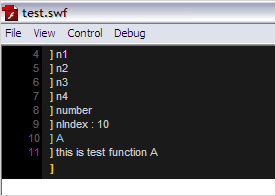 I came across a pretty sweet inline AS3 debugger today while looking for some Keith Peter's Particle Class (ported to AS3... so I don't have to port it myself). Good thing: I came across the inline debugger. Bad thing: I haven't found a port of the Particle Class yet. If I need to, I can spend the time and port it myself. Anyway...
On August 25th, Uza posted his sources to allow for inline AS3 debugger, using AS3 Global Object. Its inline (meaning it gets burned into your SWF... but its very small) but can be shown/hidden using the "~" tilde key. The full source has been freely distributed, so if you needed to customize it at all, you can.
Update: I edited the Console.as Class file (find the cacheAsBitmap flags and set them to false). Otherwise new lines of text were not being displayed for me.
Here is an example of some test code:
package$.stage = stage;. Cool. Now it works fine for normal use outside of Flex 3.
{
// AS3 Debugging Console
import lt.uza.utils.*;
public class Throwing extends Sprite
{
// Activate AS3 Global Object
// was throwing a compiler error below
private var $:Global = Global.init();
public function Throwing()
{
// Create and display debugging console
$.stage = stage; // required!
$.console = new Console();
$.console.enable();
// rest of code...
On August 25th, Uza posted his sources to allow for inline AS3 debugger, using AS3 Global Object. Its inline (meaning it gets burned into your SWF... but its very small) but can be shown/hidden using the "~" tilde key. The full source has been freely distributed, so if you needed to customize it at all, you can.
Update: I edited the Console.as Class file (find the cacheAsBitmap flags and set them to false). Otherwise new lines of text were not being displayed for me.
Here is an example of some test code:
package {
    import flash.display.*;
    import lt.uza.utils.*;

    public class ConsoleTest extends Sprite
    {
        private var $:Global = Global.init();

        public function ConsoleTest()
        {
            // Make Stage object available globally, change Stage settings.
            $.stage = this.stage;
            $.stage.scaleMode = StageScaleMode.NO_SCALE;
            $.stage.align = StageAlign.TOP_LEFT;
            // test. -get nIndex ;)
            $.nIndex = 10;

            // Initialize the Console.
            $.console = new Console();

            // Test 1: show the console on screen.
            $.console.enable();

            // Test 2: simple trace.
            $.trace("ericd.net. connected");

            // Test 3: multi trace.
            for (var i:int = 0; i<5; i++) {
                $.trace("n"+i);
            }

            // Test 4: function binding to a console command.
            $.console.register(testA,"A");
            $.console.register(testB,"B");
            $.console.register(testC,"C");
        }

        private function testA():void {
            $.trace("this is test function A");
        }

        private function testB():void {
            $.trace("this is test function B");
        }

        private function testC():void {
            $.trace("this is test function C");
        }
    }
}
This is a pretty cool solution for when you're running in a container, etc. I have a solution in-house that allows this kind of functionality with much greater flexibility, but its fairly slow and it induces a code size hit that isn't exactly small.
Comments:
There are currently 3 Comments:
-
 e.dolecki said...“I am trying to integrate this into another AS3 class I have and I am bumping into issues (might be pilot error at this point):
TypeError: Error #1009: Cannot access a property or method of a null object reference.
at lt.uza.utils::Console$iinit()
at Throwing/::init()
at Throwing$iinit()”

