

Tuesday, June 3, 2008
 Flash controlling OS X mouse
Tuesday, June 3, 2008 

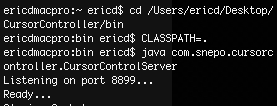 When you download the source folder, place it where you want it and then fire up the Terminal and cd to the bin directory. Now, you want to set the class path by enter this CLASSPATH=. (include that dot).
 Then you enter into the Terminal:
java com.snepo.cursorcontroller.CursorControlServer
You should see "Listening on port 8899..." and "Ready..." in the Terminal window when successful. You can now send pipe-delimited Strings to the socket server and position the system-level mouse. Run the socket server first, then launch your SWF.
Right now I'm battling to get this to work in another application, as it seems my calls to the server might be ignored right now. Hopefully I'll get this rolling.
You should see "Listening on port 8899..." and "Ready..." in the Terminal window when successful. You can now send pipe-delimited Strings to the socket server and position the system-level mouse. Run the socket server first, then launch your SWF.
var sock:Socket = new Socket("localhost", 8899);
private function sendCoords(px:String, py:String):void
{
 if(sock.connected)
 {
    var point:String = px + "|" + py;
    sock.writeUTFBytes(point + "\n");
    sock.flush();
 }
}
You should be good to go. I've tested this all out and it works great. I have a special application of mouse control in mind, but you can see this is pretty cool. Since this is Java, it will work cross-platform.Right now I'm battling to get this to work in another application, as it seems my calls to the server might be ignored right now. Hopefully I'll get this rolling.

Comments:
There are currently 0 Comments:
