

Wednesday, July 23, 2008
 Interesting bug with the latest AMP (1.1)
Wednesday, July 23, 2008 
I have just discovered an interesting bug with the latest drop of the Adobe Media Player (version 1.1). This bug involves the application window of the AIR application and the iTunes player (or probably most any window) when the AMP has focus.
How to experience this bug (OS X 10.5.4, iTunes:7.7 (43)):
Launch the latest AMP. Launch iTunes & change it's window to the mini-player. Position the iTunes window vertically below the AMP window, like so:
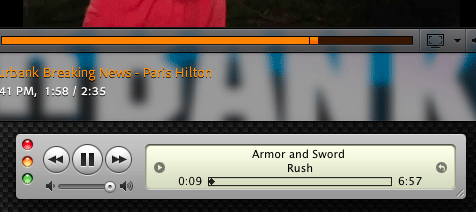
Giving AMP focus, try clicking down on the controls for iTunes... namely the Pause/Play toggle button. The button will show it's state change but the event doesn't seem to be properly fired from within iTunes. iTunes ignores the request. Repeatedly.
How to experience this bug (OS X 10.5.4, iTunes:7.7 (43)):
Launch the latest AMP. Launch iTunes & change it's window to the mini-player. Position the iTunes window vertically below the AMP window, like so:
Giving AMP focus, try clicking down on the controls for iTunes... namely the Pause/Play toggle button. The button will show it's state change but the event doesn't seem to be properly fired from within iTunes. iTunes ignores the request. Repeatedly.
I'm not sure if this is because the AMP's actual contents are larger than it's custom chrome might suggest, and thus some UI is preventing proper activation of controls in a window below it, or if there is something else afoot here. I imagine someone on the AMP team might have an idea about this.
If iTunes is *not* in it's min-player UI state, clicking on it when AMP had prior focus, system focus simply shifts to iTunes, allowing you to click again, firing the event properly within iTunes.

Comments:
There are currently 0 Comments:
